
IPTV Troubleshooting: Fix Any IPTV Problem in 2026 (Full Guide)
Every common IPTV problem and its fix in one place - buffering, freezing, black screens, no channels and EPG - plus how to tell when the fault is your provider, not you.

Every common IPTV problem and its fix in one place - buffering, freezing, black screens, no channels and EPG - plus how to tell when the fault is your provider, not you.
Key takeaways
- Most IPTV troubleshooting starts with four checks: active subscription, router reboot, wired connection and cleared cache.
- Match the symptom to the fix - buffering, freezing, black screen, no channels or EPG each have a dedicated guide.
- If everything is set right but problems return at peak time, the providerx27s servers are the cause, not your setup.
When your stream will not behave, this IPTV troubleshooting hub is the fastest way to a fix. Almost every IPTV problem — buffering, freezing, a black screen, an empty channel list or a broken TV guide — comes down to one of five things: your internet, your Wi-Fi, your app settings, ISP throttling, or the provider behind the app. Below you will find the exact fix for each symptom, plus the one honest truth cheap services never admit: sometimes the problem is not you at all.
Start here: the 60-second checks
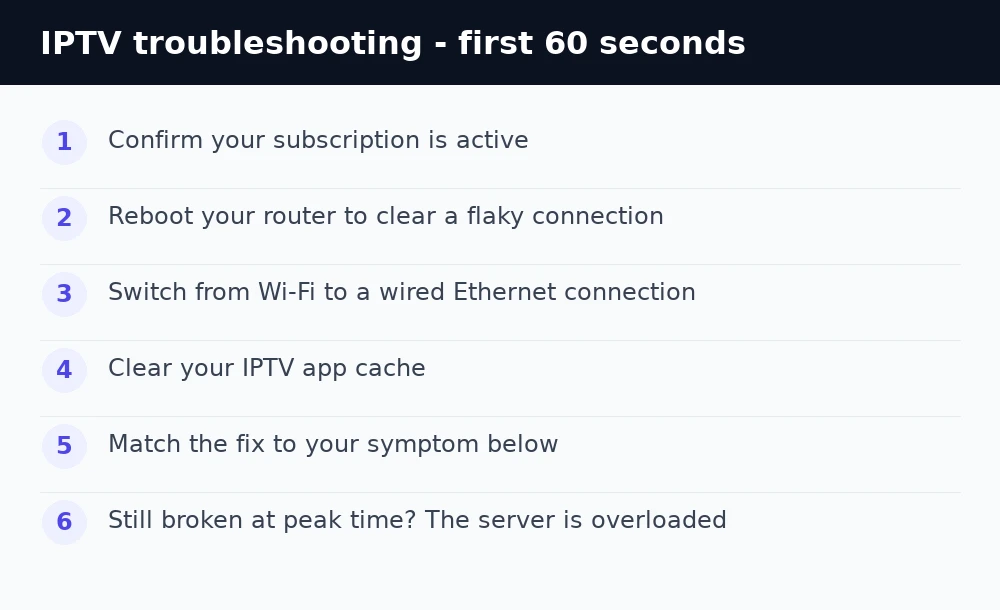
Before diving into a specific problem, these four checks solve a large share of all IPTV faults. First, confirm your subscription is active — a lapsed line is the single most common cause of everything suddenly breaking. Second, reboot your router to clear a flaky connection. Third, if you are on Wi-Fi, get wired in with an Ethernet cable. Fourth, clear your app cache. If your problem survives all four, jump to the matching guide below.
IPTV buffering
If the stream spins, stalls or keeps dropping to a lower quality, that is buffering — usually a bandwidth or Wi-Fi problem. You want around 10 Mbps for HD and 25 Mbps for 4K, a wired connection, and faster DNS. Our full guide walks through every fix in order: how to fix IPTV buffering.
IPTV freezing or pixelating
When the picture locks up or breaks into blocks every few seconds, the stream is reaching you but the connection is unstable. Reboot the router, go wired, switch DNS to 1.1.1.1, and lower 4K to HD if your line cannot hold it. Full steps here: how to stop IPTV freezing.
IPTV Smarters not working or black screen
If the app will not open, rejects your login, or shows a black screen with sound, the fix is usually the login, the decoder setting, or a stale cache. Switch the player and toggle hardware decoding to kill a black screen. Full walkthrough: fix IPTV Smarters not working. For a channel that throws an error mid-play, see fixing a playback error on IPTV Smarters.
IPTV showing no channels
An empty list or a playlist that will not load usually means an expired line, a wrong login, the wrong connection type (Xtream Codes vs M3U), or a hit connection limit. Full checklist: fix IPTV with no channels.
IPTV EPG / TV guide not working
If channels play but the guide is blank or the times are wrong, that is an EPG issue — a missing XMLTV URL, a time-zone offset, or stale data. Set the EPG URL and time zone, then refresh. Full guide: fix the IPTV EPG not working.
Setting up from scratch
If nothing is working because the app was never set up correctly, start over with our complete IPTV beginner’s guide, which covers installing a player, entering your login and loading channels on any device. If your ISP blocks IPTV entirely, see how to bypass ISP blocks.
Running a different app? Our Hot Player setup guide walks through the MAC address upload, which is the step that trips up most Samsung, LG and Roku owners.
The truth cheap providers will not tell you
Here is what ties every guide above together: if your subscription is active, you are wired in, your DNS and app settings are correct, and it still buffers, freezes or drops channels every night at peak time — the fault is the provider’s servers, not your home. Cheap, oversold services collapse under load, especially during live sport, and no setting on your device can fix an overloaded server. A provider running load-balanced, anti-freeze 4K servers like iBoostv is built to hold a steady picture exactly when weaker services fall apart, with 40,000+ channels, 200,000+ movies and a full 14-day EPG. If you have worked through the guides and problems keep coming back, switching providers is the real fix.
Still buffering?
If the fixes above did not hold, it is the provider.
Oversold servers cause most repeat buffering and freezing, and no amount of DNS tweaking or wiring will fix them. That is the one thing you cannot troubleshoot from your end.
Just testing? Start with 1 month — $13.99
14-day money-back guarantee
4K quality · 1–4 connections · Works on Firestick, Smart TV, Android, iOS, Mag & Roku
IPTV troubleshooting quick reference
Buffering or freezing? Test speed, go wired, switch DNS to 1.1.1.1, raise the buffer. Black screen? Switch the player and toggle hardware decoding. No channels? Check your subscription, re-enter the login, match Xtream vs M3U. Login refused? See IPTV Smarters failed to authorize. No guide? Add the EPG URL and set your time zone. And if everything is right but it still breaks at peak time, the server is the problem — move to a network actually built for live 4K.
Enjoying iBoostv? Get it for free.
Share your referral link and earn a free month for every person who subscribes. No limit — refer enough people and your subscription pays for itself.
Start earning free monthsFrequently asked questions
What is the first thing to check when IPTV is not working?
Confirm your subscription is active, reboot your router, switch to a wired connection, and clear the app cache. These four checks solve a large share of all IPTV problems.
Why does my IPTV work sometimes but not others?
Intermittent problems at peak time usually mean the providerx27s servers are overloaded, not your setup. Oversold services collapse under load during busy hours like live sport.
Is IPTV buffering my internet or my provider?
If your speed is good, you are wired in and DNS is fixed but it still buffers every evening, it is the providerx27s servers. A load-balanced, anti-freeze network fixes it.
How do I fix IPTV with no channels?
Check your subscription is active, re-enter the login exactly, match the connection type (Xtream Codes vs M3U), and confirm you have not hit your device limit.
